Fabflix
Project Description
Fabflix is an exercise in implementing relational databases, load balancing, and cloud computing into a typical consumer model web application in order to make it scalable.
The web application of choice in this scenario is a combination of an online store and movie database, such as IMDB.
On the client side interface, users can sort, filter, and navigate through a large movie database using various different criteria. The website is set up through a collection of tables and links, where users can click on various movies, genres, and stars to see all related information. After signing in, users can add movies to their cart, and place an order. After checkout, the user’s order will appear in their order history.
Users can filter the database by title, genre, and star. They can sort the database ascending or descending by alphabetical order or rating. There is also an advanced search function available to specify a movie’s title, year, genre, and director.
Design Choices
Fabflix is primarily comprised of Java, HTML, Javascript, and MySQL, all running on 3 AWS EC2 instances.
The backend uses Tomcat10 as a webserver to host Java Servlets and static web content in the form of HTML and javascript files. This serves the purpose of providing a user interface for reading and writing to the database.
The database is hosted on a MySQL server that the servlets communicate with through JDBC. The relational database is comprised of eleven tables for subjects such as customers, movies, ratings, and stars, all connected through primary keys consisting of unique ids for each subject. This makes filtering and sorting large amounts of connected information simple and efficient.
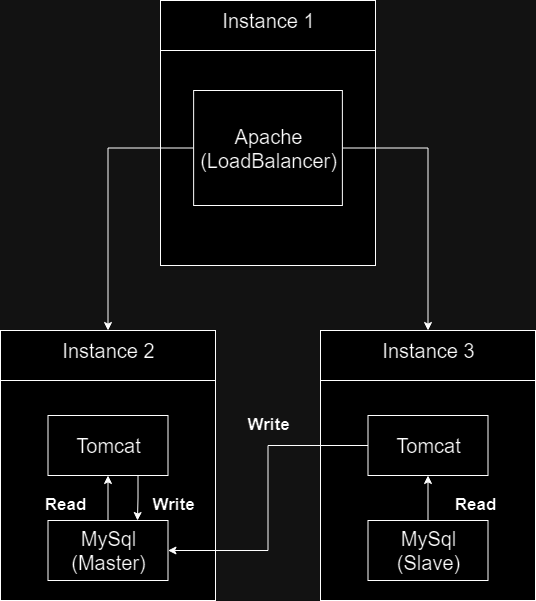
The 3 EC2 instances are designated to one load balancer, and two identical copies of the Fabflix application running on Tomcat, along with a MySQL database. An Apache server running on one instance balances requests by dividing load between the two instances via their private IP Addresses, making use of AWS’s VPC.
Technical Challenges and Considerations
Proper Database Connection with Load Balancing
The cart and checkout feature of the application was implemented in order for there to be a scenario where data is being written to the database in the form of order history. Since there are two separate databases, and users can randomly be assigned to one of them, there needed to be a way to ensure both databases have consistent data.
In order to accomplish this, a Master Slave framework is set up between the two databases. One database recieves all of the update queries, and then relays the queries immediately to the other database, resulting in perfect replication. For this to work, one database must recieve all update queries, while evenly distributing select queries (Update being “write”, select being “read”). To accomplish this, both webservers will connect to the database running on localhost by default for read queries. Since the load balancer is distributing requests to the webservers, this inherently load balances read requests to the databases as well. Whenever a webserver is asked to write to the database, they will connect directly to the Master database directly by IP, ensuring all write requests are sent directly to the Master database.
The databases needed to be connected in some manner that ensured replication without an inordinate amount of latency. Connecting over the internet could introduce some fallibility, due to the uncertainty and latency of requests having to resolve over multiple domains. Luckily, however, all AWS instances reside under the same VPC, meaning that when connecting through private IP (in the case of both the databases and the load balancer), the request never leaves the local network for resolution, resulting in better security and latency.
Adding New Movies with Foreign Keys to Other Tables
Updating values into a highly connected relational database can be tricky, because one insertion can have a rippling affect on multiple different tables. In the case of inserting a new movie, said movie will have a rating, a director, stars, and genres, all of which have a respective id in their own tables.
Fabflix has an employee dashboard only accessible by user accounts that are identified as employees. The dashboard has functionality that allows insertion of new movies into the database, along with any other relevant information pertaining to that movie. Due to the amount of modification that needs to happen in the database according to this insertion, the best method is to use a stored procedure in the database.
CREATE DEFINER=`root`@`localhost` PROCEDURE `add_movie`(
    title varchar(100),
    m_year int,
    director varchar(100),
    star_name varchar(100),
    genre varchar(32)
)
BEGIN
	IF NOT EXISTS (SELECT * FROM stars WHERE name = star_name) THEN
		INSERT INTO stars VALUES (CONCAT("nm", (CAST(substring((select cid from (select max(id) as cid from stars) as c), 3) AS UNSIGNED) + 1)), star_name, NULL);
	END IF;
	IF NOT EXISTS (SELECT * FROM genres WHERE name = genre) THEN
		INSERT INTO genres VALUES ((select cid from (select max(id) as cid from genres) as c) + 1, genre);
	END IF;
    IF EXISTS (SELECT * FROM movies WHERE movies.title = title AND movies.year = m_year AND movies.director = director) THEN
		SELECT CONCAT(title, " already exists") as message;
	ELSE
		INSERT INTO movies (id, title, year, director)  VALUES (CONCAT("tt", (CAST(substring((select cid from (select max(id) as cid from movies) as c), 3) AS UNSIGNED) + 1)), title, m_year, director);
        INSERT INTO stars_in_movies VALUES ((SELECT id FROM stars WHERE name = star_name LIMIT 1), (SELECT id FROM movies WHERE movies.title = title AND movies.year = m_year AND movies.director = director LIMIT 1));
		INSERT INTO genres_in_movies VALUES ((SELECT id FROM genres WHERE name = genre LIMIT 1), (SELECT id FROM movies WHERE movies.title = title AND movies.year = m_year AND movies.director = director LIMIT 1));
        INSERT INTO ratings VALUES ((SELECT id FROM movies WHERE movies.title = title AND movies.year = m_year AND movies.director = director LIMIT 1), 0, 0);
        SELECT CONCAT("Successfully added Movie ID:", (SELECT id FROM movies WHERE movies.title = title AND movies.year = m_year AND movies.director = director LIMIT 1),
        ", Genre ID:", (SELECT id FROM genres WHERE name = genre LIMIT 1), ", Star ID:", (SELECT id FROM stars WHERE name = star_name LIMIT 1)) as message;
	END IF;
END
Maintaining Cart Items in Session Data or Database
With most online services, user login is maintained within the session. If one revists a page using a web browser that both was signed in and contained cookies, if the session data hasn’t expired, that user will remained logged in. Fabflix follows this behavior, with the exception of items within the cart. While most web services will associate the cart with the user account, in Fabflix the cart lives and dies with the session.
Establishing cart permanence would require storing the cart data within the database, and replicating the cart data to all other databases. One possibility would be to create a new Item table, and associate all item entries with a customer ID as a primary key, however that would introduce many new individual queries for handling cart information, leading to more complication.
Another possibilty would be serializing the Item class already implemented in the backend, and simply storing the serialization in a new table with the customer ID as a primary key. This would be the most likely solution to permanence, however it contradicts the use of relational databases, as we are grouping distinct information together. This implementation would be more suited towards a NoSQL implementation, such as MongoDB, so it was not pursued.
Query Building for Various Search Operations
Working with JDBC and MySQL requires query strings that are loaded into Statements and executed. This returns a ResultSet with the response data. For security and compatability with connection pooling, these must be Prepared Statements to prevent common injection vulnerabilities.
Users have multiple options when searching for data in Fabflix. When there are multiple search conditions specified, it is far more efficient to specify these conditions in the query string, rather than sorting and filtering a widespread request of all data from the database. In order to accomplish this, query strings need to be dynamically updated according to the requested conditions.
One method of doing this would be to use an established query string builder implementation in Java. This would look like something along the lines of jOOQ. There is contention about whether or not using a third party library to build queries is an anti-pattern, and whether or not it solves or further complicates problems. Given the highly specified format of what was required to make Fabflix work, making a smaller, customized query builder was deemed the best solution.
Choice of Software and Frameworks
Tomcat VS Springboot
Using a Java backend was not a very contentious idea, being that the alternative of NodeJS had some pros and cons, however choosing Tomcat over Springboot was more difficult.
Springboot is a very mature and useful framework, which would take care of many tedious parts of the development process for the developer. It certainly covers many weaknesses of using only servlets, such as data validation. Should Fabflix continue to develop and it was decided to change technologies, this would be one of the first upgrades to take place. For now, however, as Fabflix is simply a demonstration, Java servlets and Tomcat more than suit the basic needs of Fabflix’s backend, especially since most of the heavy lifting is being done by Java itself.
Vanilla Javascript VS JQuery VS React
JQuery was the first choice in creating frotend backend separation, since it is very familiar, and is the next step from using the very outdated JSP framework for serving dynamic HTML. Into the development process however, it became clear that vanilla Javascript, especially “fetch”, could cover many of JQuery’s bases along with being much more up to date and supported.
Should Fabflix undergo further development, React would appear to be a natural next step for the frontend, considering the incredible flexibility of Web Components, and greatly speeding up response times with React’s Virtual DOM.